🚀 Node-based AI Pipeline

Visual
AI Workflow
Builder

Design complex AI pipelines with drag and drop. Combine multiple LLM models and leverage RAG to extract requirements from documents.

6 Types Node Types
3 LLM Providers
RAG Knowledge Base
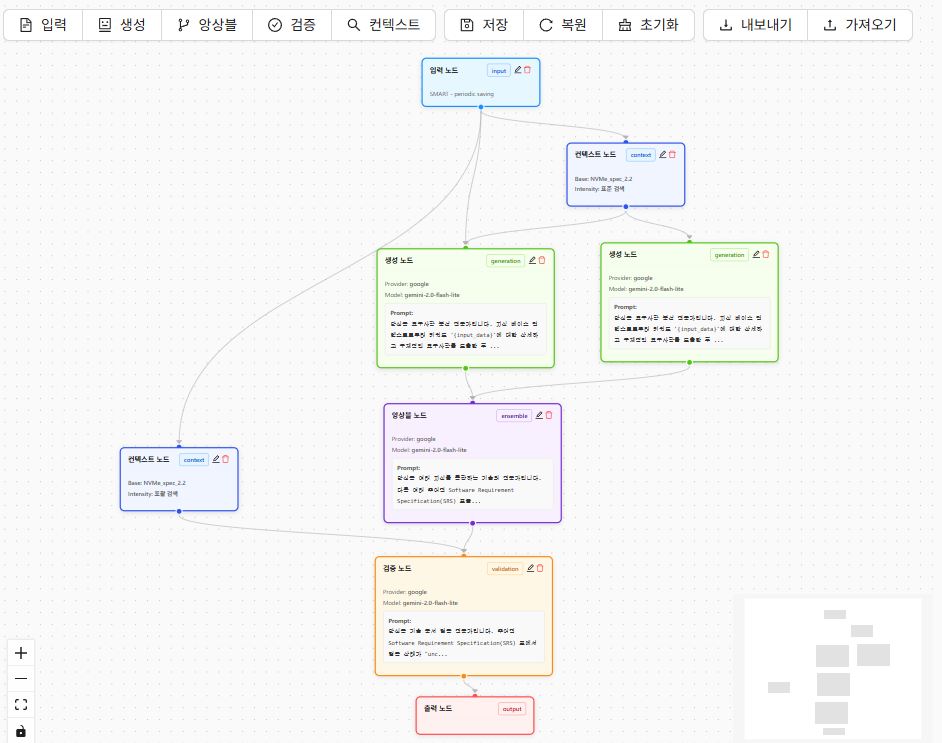
MultiModelGenerator workflow example - AI pipeline with input, context, generation, ensemble, and validation nodes connected
Who Is This For?

Perfect For These Users

A tool for everyone who wants to efficiently handle complex AI tasks.

📋

System Analysts & PMs

Auto-extract requirements from tech docs

  • Analyze hundreds of pages in minutes
  • Systematic extraction without missing details
  • Improved accuracy via multi-model validation
🔬

AI/ML Researchers

Compare LLM models & experiment with prompts

  • Compare GPT-4, Gemini, and more side by side
  • Analyze result differences from prompt variations
  • Reduce hallucinations with ensemble & validation
📚

Technical Writers

Automate document summarization

  • Auto-summarize large documents
  • Context-aware Q&A powered by RAG
  • Generate consistent output formats
⚙️

Developers & Engineers

Visually build complex AI pipelines

  • Design and test workflows without coding
  • JSON export for automation integration
  • API integration with existing systems
Core Concept

AI Pipeline Connected by Nodes

Input data flows through nodes, with each node performing LLM processing, RAG search, validation, and more.

Workflow concept - AI pipeline where input data flows through context, generation, ensemble, and validation nodes to output
📥

Input/Output Nodes

Starting point for text data and display of final results.

🤖

LLM Nodes

Generation, Ensemble, and Validation nodes utilize LLMs like GPT-4 and Gemini.

🔍

Context Nodes

RAG-based retrieval of relevant context from knowledge bases.

Node Types

6 Powerful Nodes

Each node has a unique role, and connecting them creates complex workflows.

📥

Input Node

Starting point of the workflow. Enter text to analyze.

🤖

Generation Node

Uses LLM to generate requirements, analysis results, etc.

🔀

Ensemble Node

Combines and organizes outputs from multiple nodes.

✅

Validation Node

Validates generated results against knowledge base.

🔍

Context Node

RAG-based retrieval of relevant context from knowledge base.

📤

Output Node

Displays the final result of the workflow.

Key Features

Powerful Workflow Builder

Visual canvas, multi-model support, knowledge base management, and more core features.

1

Visual Workflow Canvas

Place and connect nodes on an intuitive React Flow-based canvas.

  • Drag and drop node placement
  • Define data flow by connecting nodes
  • Real-time execution status visualization
  • JSON export/import
Workflow canvas - Node placement and connection interface
2

Detailed Node Configuration

Click on each node to open its settings panel.

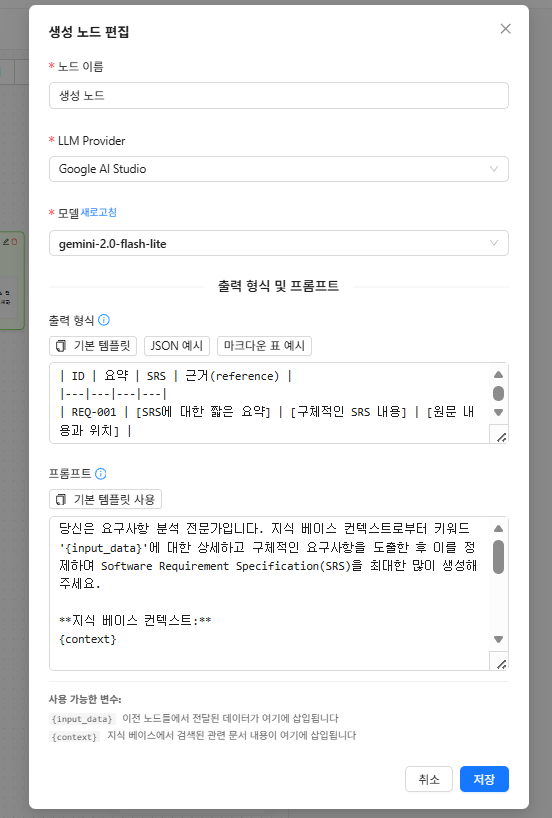
  • Select LLM provider and model
  • Customize prompt templates
  • Knowledge base selection and search intensity
  • Rerank option settings
Generation node settings - LLM provider (Google AI Studio), model (gemini-2.0-flash-lite) selection and prompt template configuration
3

Knowledge Base Management

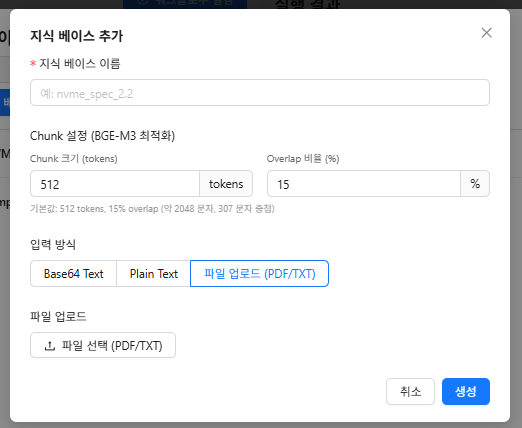
Upload PDF, TXT documents to create vector DBs and use them for RAG.

  • PDF, TXT file upload
  • Organized management with folder structure
  • BGE-M3 multilingual embeddings
  • Password-based protection
Add knowledge base - Chunk settings (BGE-M3 optimized, 512 tokens, 15% overlap), PDF/TXT file upload
4

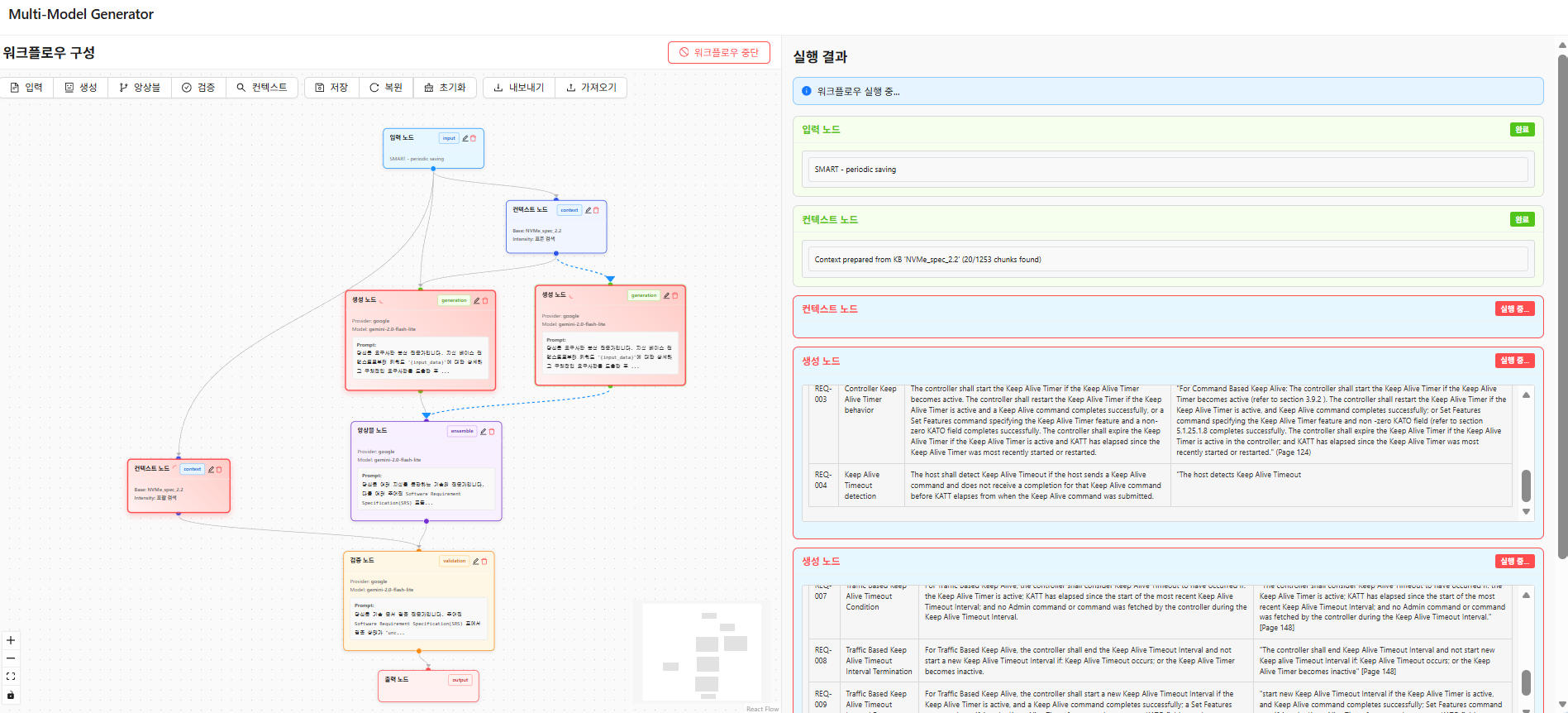
Real-time Streaming Execution

LLM responses stream in real-time when executing workflows.

  • Real-time LLM response streaming
  • Per-node execution status display
  • Parallel execution of independent nodes
  • Execution stop functionality
Workflow running - Left canvas shows node execution status, right panel displays real-time streaming results
Demo

See It In Action

Watch the entire process from workflow configuration to execution.

A workflow demo that searches keywords from documents, generates requirements with LLM, and validates them with another LLM

🔗

Node Connection

Define data flow by dragging to connect nodes.

🔍

RAG Search

Context nodes search relevant context from knowledge base.

⚡

Real-time Results

LLM responses are streamed and displayed in real-time.

Tutorial

Getting Started

Follow along step by step to create your first workflow.

1

Create Knowledge Base

Upload documents (PDF, TXT) to create a knowledge base. You can organize them systematically with folders.

Create knowledge base - Set name, chunk size (512 tokens), overlap ratio (15%), upload PDF/TXT files
2

Add & Connect Nodes

Add nodes using the top buttons and drag handles to connect them. Combine outputs from multiple generation nodes using an ensemble node, and verify LLM outputs against the knowledge base using validation nodes to reduce hallucinations.

Add and connect nodes - Workflow with input, context, generation, ensemble, validation, and output nodes connected
3

Configure Nodes

Click each node to select LLM Provider and model, configure output format, and write prompts. In prompts, use {input_data} to receive outputs from connected previous nodes, and {context} to access search results from connected context nodes.

Generation node settings - LLM provider and model selection, output format specification, prompt template writing
4

Execute Workflow

Click "Execute Workflow" button to run nodes sequentially/in parallel, with results streaming in real-time.

Workflow execution - Per-node execution status (running, completed) and real-time result streaming
5

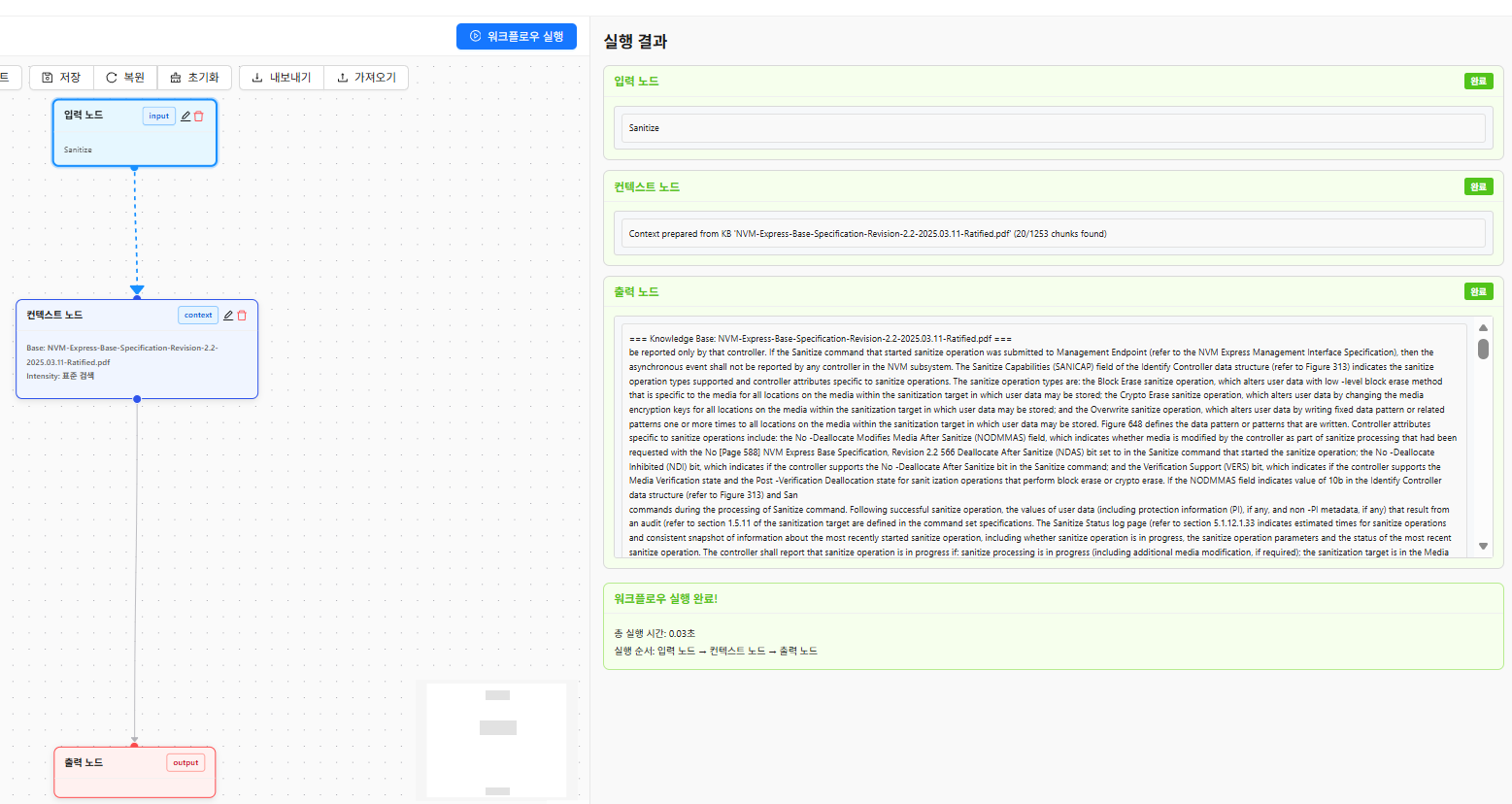
Review & Save Results

Check final results in the output node and results panel. Save workflows or export to JSON for reuse.

Review results - Related documents retrieved from knowledge base by context node and final output results
Tech Stack

Built on Modern Technologies

Built with proven frameworks and libraries.

💻 Frontend

React 18 with TypeScript
React Flow Graph Editor
Ant Design UI Components
Zustand State Management

⚙️ Backend

FastAPI Async REST API
ChromaDB Vector Store
BGE-M3 Multilingual Embedding
Reranker Improved Search Quality

Start Your AI Workflow

Build complex AI pipelines easily with MultiModelGenerator.